This is our completed music video which we have uploaded onto YouTube!
Showing posts with label Final Idea. Show all posts
Showing posts with label Final Idea. Show all posts
Thursday, 19 December 2013

Friday, 13 December 2013

Thursday, 12 December 2013
Final Digi Pack


Front Cover & Spine.
Back Cover.


Disc.
Disc background/inlay, inlay booklet front cover, inlay pouch.


Tuesday, 26 November 2013
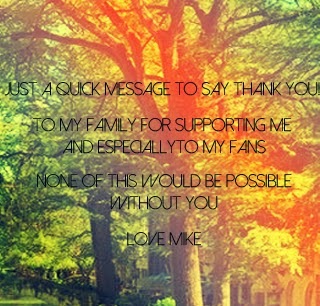
Magazine Advert Editing
 - 1. Uploaded the selected image (from back of digipak) onto Photoshop.
 - 2. Then adding a blue filter and a cream filter made the image have a vintage effect.
 - 3. After placing the filter over the top, we increased the contrast and brightness of the image and created two orange/red gradients. One coming from the corner and the other as a line down the centre.
 - 4. We then created a soft toned boarder around where the digipak is placed.
 - 5. We then added the text, 'Mike Dignam' which is in the same font as the song list on the back of the album; 'Debut Album' and 'Out Now' is also in the same font but has been put in a linear light. 'I'll Lie Here' is in the same font as on the front digipak cover.
 - 6. An Itunes logo has been added but faded slightly and a new boarder created.
 - 7. Inside the boarder, star ratings have been added in the linear light again.
 - 8. To finish it off, music magazine ratings have been added to the stars, creating an attraction. Mike Dignam's website and twitter have also been written underneath.
Wednesday, 20 November 2013


Tuesday, 12 November 2013
Overlay Editing - Inlay Booklet Front Cover
To improve our images to make them seem more professional and artistic, our group decided to experiment with overlaying the image for the front cover of our inlay booklet. This added depth to the images and I found the technique added a unique and different feel to it.
The Process...
 - 1. We put the image we wanted to use as a base layer/image on Photoshop.
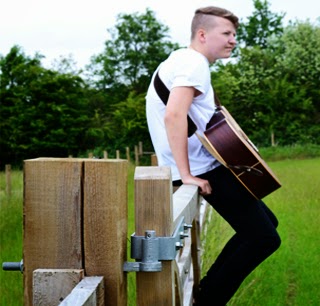 - 2. We then created a copy of this layer, which also enhanced the colour slightly.
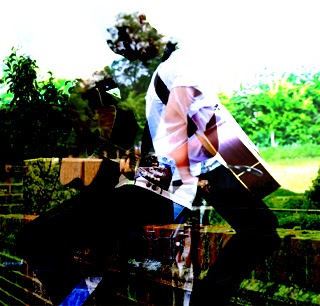 - 3. We then selected the image we wanted to overlay onto the image and placed it on top of the original image and then selected the soft overlay option.
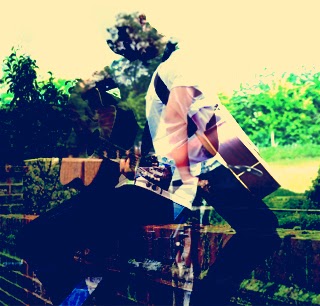 - 4. Next we added a blue filter to it.
 - 5. Then an additional creamy filter.
 - 6. Then adjusted the brightness and contrast.
The Process...
- 1. We put the image we wanted to use as a base layer/image on Photoshop. - 2. We then created a copy of this layer, which also enhanced the colour slightly. - 3. We then selected the image we wanted to overlay onto the image and placed it on top of the original image and then selected the soft overlay option. - 4. Next we added a blue filter to it. - 5. Then an additional creamy filter. - 6. Then adjusted the brightness and contrast.
Wednesday, 6 November 2013
Meeting 5/11/2013
Today we discussed the location, evaluation of our practice filming and updating our blogs with more gadgets/widgets to provide viewers with more satisfaction of our blogs.
Having already created a Twitter account for the media group, we were able to provide our blogs with a Twitter widget which updates and presents any tweets that have been made such as, about the progress of our music videos, and any inspirational tweets that we may retweet or comments we have made. On Twitter we have followed some artists that we think can relate to our chosen singer/songwriter, various artists include; Jason Mraz, Ben Howard, Ed Sheeran, John Mayer. Another few accounts that we think were worth following were Radio 1's Twitter profile and various DJs that are involved in that area. This gives us updates on our Twitter Feed of any new and upcoming music that we may be interested in and relate to Mike Dignam. In relation to Mike, we have followed him on Twitter which allows us to become updated on tour dates and any comments, personal updates from him that could link to our music video narrative.
In the lesson today, we also talked about the final location dates as all members of the media group were in the lesson. Locations finalised included, a Train Station (perhaps situated in Newport, Essex), a photo booth (although this could be known as a prop), a calm and collected forest type scene (perhaps a Bluebell woods or something similar). I think all these locations would be great when filming as they will give us some fantastic shots, also filming in Cambridge would be a good idea as it will give some great shots of the Urban environment in comparison to the natural/rural scenes of a forest.
Having already created a Twitter account for the media group, we were able to provide our blogs with a Twitter widget which updates and presents any tweets that have been made such as, about the progress of our music videos, and any inspirational tweets that we may retweet or comments we have made. On Twitter we have followed some artists that we think can relate to our chosen singer/songwriter, various artists include; Jason Mraz, Ben Howard, Ed Sheeran, John Mayer. Another few accounts that we think were worth following were Radio 1's Twitter profile and various DJs that are involved in that area. This gives us updates on our Twitter Feed of any new and upcoming music that we may be interested in and relate to Mike Dignam. In relation to Mike, we have followed him on Twitter which allows us to become updated on tour dates and any comments, personal updates from him that could link to our music video narrative.
In the lesson today, we also talked about the final location dates as all members of the media group were in the lesson. Locations finalised included, a Train Station (perhaps situated in Newport, Essex), a photo booth (although this could be known as a prop), a calm and collected forest type scene (perhaps a Bluebell woods or something similar). I think all these locations would be great when filming as they will give us some fantastic shots, also filming in Cambridge would be a good idea as it will give some great shots of the Urban environment in comparison to the natural/rural scenes of a forest.
Sunday, 3 November 2013
Final Album Name
We have decided during our filming that 'I'll Lie Here' will be the name of the digipak. At the beginning of our video we have included a scene without sound of Danny inserting that has Mike Dignam - I'll Lie Here written on it. This concluded the name of the album as we don't want the audience to get confused with the CD being named.

Saturday, 2 November 2013


Sunday, 27 October 2013
Storyboard Part I

Above shows our first few scenes up to 1:35 of our chosen song 'I'll Lie Here'. We have presented our storyline in separate parts as the whiteboard wasn't big enough to have the whole storyboard on there and we have limited time before our markings are rubbed off.
Number of seconds on each shot:
- 0:00-0:03 secs
- 0:03-0:05
- 0:05-0:07
- 0:07-0:09
- 0:09-0:11
- 0:11-0:13
- 0:13-0:15
- 0:15-0:18
- 0:18-0:26
- 0:26-0:30
- 0:30-0:36
- 0:36-0:42
- 0:42-0:48
- 0:48-0:54
- 0:54-1:00
- 1:00-1:03
- 1:03-1:16
- 1:16-1:19
- 1:19-1:21
- 1:21-1:26
- 1:26-1:31
- 1:31-1:35
Tuesday, 22 October 2013
Final Idea For Our Music Video
Deciding on our final idea for our music video was a difficult decision to make, for example how and which effects we would use such as the god like figure (as explained previously http://nfgsannahigginson.blogspot.co.uk/2013/10/god-figure-idea.html ) or we use the singer as one of the character in the relationship. However we decided to not use the singer as the omniscient narrator but use him as the main male character who is demonstrated through the relationship with the girl and through lip syncing. I think this approach will work well especially as we can use the effect of the overlay of scenes as the singer is shown in the past and the present of the narrative.
I created this Prezi myself to make it more clear as to how the storyline will develop throughout the music video and how the techniques used will evolve.
I created this Prezi myself to make it more clear as to how the storyline will develop throughout the music video and how the techniques used will evolve.
Thursday, 17 October 2013
Overlay Technique
As a group, we have decided to attempt the overlay technique in our music video which we got inspiration from Olly Murs' music video for 'Dear Darlin', where he uses an identical location and overlays his image to therefore identify how him and his girlfriend acted when they were together and the good times they had. This was done with Olly in the room, sitting on the sofa whilst lip syncing. I really like this effect and I think it would work well with our music choice as its a similar narrative of looking back at the good times of the love story. In order to succeed with this idea, we would have to film it twice in the same location with the camera still running throughout the scene, then we would edit it on Final Cut Express and cut, overlay and alter the opacity of the image to make it subtle but effective.
This technique is very common in Photography where the artist has used Photoshop to create an overlap of photos. An artist that specialises in this area, Ho Ryon Lee, demonstrates the texture of photography being used and reproduced which is defined as photorealism (photo-like picture), so he took several photos of a model standing in a specific pose; the photos are then composed together via photoshop, and Ho Ryon then paints his finalised product on canvas.


This technique is very common in Photography where the artist has used Photoshop to create an overlap of photos. An artist that specialises in this area, Ho Ryon Lee, demonstrates the texture of photography being used and reproduced which is defined as photorealism (photo-like picture), so he took several photos of a model standing in a specific pose; the photos are then composed together via photoshop, and Ho Ryon then paints his finalised product on canvas.
Subscribe to:
Posts (Atom)