
Showing posts with label Design. Show all posts
Showing posts with label Design. Show all posts
Friday, 13 December 2013

Thursday, 12 December 2013
Final Digi Pack


Front Cover & Spine.
Back Cover.


Disc.
Disc background/inlay, inlay booklet front cover, inlay pouch.


Tuesday, 26 November 2013
Magazine Advert Editing
 - 1. Uploaded the selected image (from back of digipak) onto Photoshop.
 - 2. Then adding a blue filter and a cream filter made the image have a vintage effect.
 - 3. After placing the filter over the top, we increased the contrast and brightness of the image and created two orange/red gradients. One coming from the corner and the other as a line down the centre.
 - 4. We then created a soft toned boarder around where the digipak is placed.
 - 5. We then added the text, 'Mike Dignam' which is in the same font as the song list on the back of the album; 'Debut Album' and 'Out Now' is also in the same font but has been put in a linear light. 'I'll Lie Here' is in the same font as on the front digipak cover.
 - 6. An Itunes logo has been added but faded slightly and a new boarder created.
 - 7. Inside the boarder, star ratings have been added in the linear light again.
 - 8. To finish it off, music magazine ratings have been added to the stars, creating an attraction. Mike Dignam's website and twitter have also been written underneath.
Saturday, 23 November 2013
Magazine Advert Ideas & Conventions
For our magazine advert to look as professional and authentic as it could be our group decided that we need to incorporate the following into it; the title of the album, the image of the album, reviews, the Artists website, a design similar to the Album, links to purchases places, ratings, an image of the artist, CD logo and a selection of cross media platforms. These are the common features of all magazine adverts.
The common conventions of Indie Adverts are normally that they have the appearance of being designed with a vintage feel and artistically which overall tends to be quite simple but creative. I believe that an image such as a photo of the artist with a vintage tint would really show that it is from this genre, which is used mostly in Indie. There is often a link to the Artists website or their twitter accounts so they can be easily connected with the artist.
The two types of magazine advert are either artist or album focused adverts; meaning as our artist is still not hugely well known and is still very independently run, our advert will be artist focused. Our advert must link with the Digi pack and relate to each other, at best they can.When choosing the right image, font and content for our magazine advert, it is important we include and take into account the content above.
The common conventions of Indie Adverts are normally that they have the appearance of being designed with a vintage feel and artistically which overall tends to be quite simple but creative. I believe that an image such as a photo of the artist with a vintage tint would really show that it is from this genre, which is used mostly in Indie. There is often a link to the Artists website or their twitter accounts so they can be easily connected with the artist.
The two types of magazine advert are either artist or album focused adverts; meaning as our artist is still not hugely well known and is still very independently run, our advert will be artist focused. Our advert must link with the Digi pack and relate to each other, at best they can.When choosing the right image, font and content for our magazine advert, it is important we include and take into account the content above.
Wednesday, 20 November 2013


Tuesday, 12 November 2013
Overlay Editing - Inlay Booklet Front Cover
To improve our images to make them seem more professional and artistic, our group decided to experiment with overlaying the image for the front cover of our inlay booklet. This added depth to the images and I found the technique added a unique and different feel to it.
The Process...
 - 1. We put the image we wanted to use as a base layer/image on Photoshop.
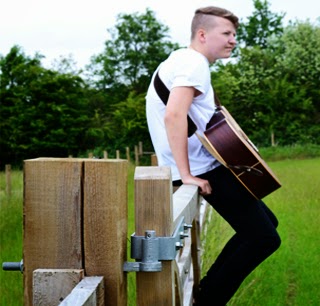 - 2. We then created a copy of this layer, which also enhanced the colour slightly.
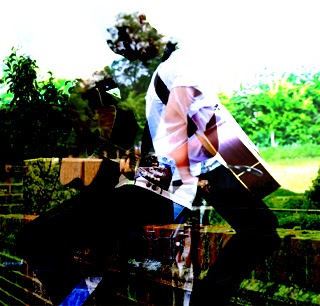 - 3. We then selected the image we wanted to overlay onto the image and placed it on top of the original image and then selected the soft overlay option.
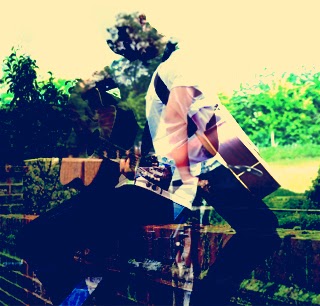 - 4. Next we added a blue filter to it.
 - 5. Then an additional creamy filter.
 - 6. Then adjusted the brightness and contrast.
The Process...
- 1. We put the image we wanted to use as a base layer/image on Photoshop. - 2. We then created a copy of this layer, which also enhanced the colour slightly. - 3. We then selected the image we wanted to overlay onto the image and placed it on top of the original image and then selected the soft overlay option. - 4. Next we added a blue filter to it. - 5. Then an additional creamy filter. - 6. Then adjusted the brightness and contrast.
Saturday, 2 November 2013


Tuesday, 29 October 2013
Taking Digi Pack Photos


 In order to create our digipak, myself and Danny took a trip to take some photos. I thought it would be best (from research) that we capture the shots in a rural and natural environment as that is a well known element in the Indie genre. See http://nfgsannahigginson.blogspot.co.uk/2013/10/outdoors-guitar-urban-natural.html I took these photos with my digital Nikon D3100 which performed very well especially in the weather conditions as the photos didn't look as gloomy.


Subscribe to:
Posts (Atom)